Settings
Open it with the Settings button in the toolbar, or from quick search under Tab.
The Settings screen has two tabs: Preferences and Shortcuts. Preferences opens first, except from the welcome screen's Shortcuts row, which opens Shortcuts.
The theme and the display language are not on this screen. The toolbar's Theme and Display Language buttons open them — see Language and Theme.
Relationship DataType Sync
Determines whether to synchronize data types. It is on by default.
Changing a column's data type then applies it to every column joined to it by a relationship, following the chain from both ends, so a foreign key never drifts from the key it references.
From a key to its foreign keys, a serial type goes as the integer type it stores, as it does when a relationship is drawn — see Identifying Relationships. So changing a key to serial gives its foreign keys integer under PostgreSQL, and the change goes on down the chain from there.
From a foreign key back to its key, the type goes as written, except that a serial key keeps its type and the change stops there.
Map Columns follows this setting too: while it is on, each existing column it maps takes the type its parent key gives a foreign key, and the change goes on along the relationships as above. While it is off, or when the key has no data type, the column keeps its own.
A domain gives its Data Type to the columns linked to it, when that type changes and when a column is linked. While this setting is on, the change goes on along the relationships from each of those columns as above; while it is off, only the linked columns change. A column that takes its domain's type in that step keeps it, even where the sync would give it another, such as the integer type a serial key gives its foreign keys.
A linked column that the sync or Map Columns gives a type other than its own domain's is unlinked from that domain in the same step — see Unlinking. No paste of columns carries a type along this setting, not even the type of a domain the paste links — see Copying/Pasting Columns. A Data Type pasted on the Dictionary tab's Domains sheet does, as any change to a domain's type does.
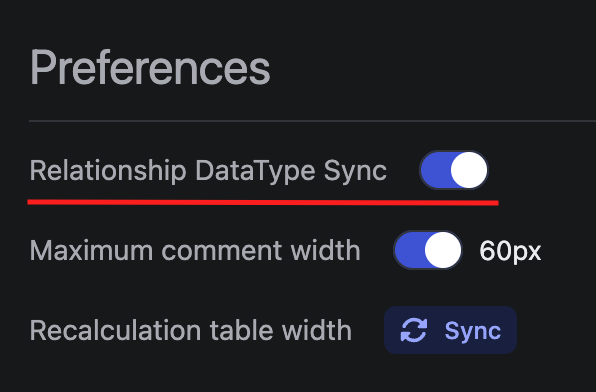

Maximum Comment Width
Specifies the maximum width of the comment column in pixels (60 ~ 200).
Turning the switch off removes the limit, and the input is disabled while it is off.
Turning it on starts at 60px. A value typed outside the range is clamped to the nearest end.

Lock
The Lock list holds seven settings. While a setting's lock is on, the file keeps the value it had when locked, so changing it on screen leaves the file as it was.
| Row | What the file keeps | In a new diagram |
|---|---|---|
Viewport | The ERD canvas's zoom level and view position, as one lock | 100% · 0, 0 |
Canvas Type | The tab the diagram opens on: ERD, Visualization, Schema SQL, Code Generator, or Dictionary | ERD |
Language | The Code Generator language | GraphQL |
Table Name Case | The Code Generator's table name case | Pascal |
Column Name Case | The Code Generator's column name case | Camel |
Bracket Type | The Bracket of the Schema SQL tab and of the Code Generator targets that offer it | None |
Name View | The Name View the diagram opens in: Physical Names, Logical Names, or Both Names | Physical Names |
Each row shows a value and a lock button, and a click on the button turns that one lock on or off.
While a lock is on, the button shows a closed lock with the tooltip Unlock Viewport (and so on for each row), and the value, with the tooltip Locked value, is the one the file keeps.
While it is off, the button shows an open lock with the tooltip Lock Viewport, and the value, dimmed, with the tooltip Current value, is the setting as it stands now.
Viewport reads as the zoom and then the view position, such as 75% · -40, 91. The view position is the point on screen, in pixels, where the diagram's 0, 0 lies, and a coordinate of a thousand or more is shortened, as in 1.2k or -24k.
Locking takes the setting as it stands at that moment.
While a lock is on, the setting still works on screen: you can scroll and zoom, switch tabs, pick another language, name case, or bracket from the menus, the options panels, or quick search, and switch the Name View from any of its pickers — see Switching the View.
The file keeps the locked value, though, and the row keeps showing it, so the diagram reopens at the locked view, on the locked tab, in the locked Name View, and with the locked language, name cases, and bracket. A JSON export writes the locked values too.
To save what the screen shows, turn the lock off, and the file follows the setting from then on: with Viewport off, the diagram opens where you left it. To lock a new value instead, such as a new starting view, turn the lock off and on again.
If the locked view shows none of the diagram when the file opens, the screen still moves onto the diagram, and the locked value stays as it is.
Canvas Type never keeps the Settings tab. Turning it on locks the last other tab you were on, and while it is off, its row names that tab.
Turning a lock on or off changes the file, since the file stores which locks are on, but like the rest of the Settings tab it is not recorded in the undo history. Neither is a Name View switch, locked or not.
Every other setting is saved as it stands: the database, the View Option toggles, and the rest of the Preferences tab.
A read-only editor changes the file through none of them, whatever the locks say: its lock buttons and the other Preferences controls are disabled, and the settings it still lets you change stay on that screen — see Read-only Editors.
Every lock is on in a new diagram, one started from nothing: an empty file opened in VS Code, Obsidian, or a JetBrains IDE (Obsidian's ERD Editor: Create new diagram and New ERD make one), a new schema in the web app, a file made from Google Drive's New menu, or an <erd-editor> given no value.
A schema or Google Drive file that the web app makes by importing a SQL, DBML, AML, or GraphQL file starts with every lock on as well. One made from a JSON file keeps the locks that file records.
A file you open keeps the locks it was saved with, each at its locked value.
A file that records no locks, such as one saved by a release from before the locks or written by hand, opens with every lock on: the view at 100% · 0, 0 and the tab at ERD, whatever view and tab it saved, and its language, name cases, bracket type, and Name View locked as it saved them.
A file saved by a release from before the Name View lock opens in Physical Names with Name View locked, even if every other lock it records is off.
An Import that replaces the diagram sets the locks too: a JSON file brings the locks it records and the values they hold, and a SQL, DBML, AML, or GraphQL file keeps your locks but puts the view back at 100% · 0, 0, locked or not — see Importing External Files. Undoing the import brings back the locks and locked values it replaced.
A change a lock keeps out of the file is not counted as a change. VS Code does not mark the tab modified, and Obsidian and a JetBrains IDE leave the file as it was, both when they save on their own and when the tab closes.
So with every lock on, looking around a diagram, switching tabs, trying another language, name case, or bracket, and switching the Name View never show up in git diff.
With Viewport off, scrolling and zooming change the file; with Canvas Type off, so does switching tabs, including to the Settings tab; and with Name View off, so does switching the Name View.
A new diagram's empty file stays empty until the first change the file keeps: an edit, a change to a setting no lock holds, or a lock turned on or off.
Opening a diagram and closing it with no such change leaves the file as it was, whichever release or machine wrote it. The file holds only what the diagram is, in a fixed order, and a file saved in an older form is rewritten in this form once, on its first such change — see Storage Form and Runtime Value.
In VS Code, a revision reopened as a diagram with Reopen Editor With..., such as a Git revision or a Local History entry, is read-only and never marked modified.
In Google Drive, a scroll, a zoom, or a switch to another tab is never saved on its own, locked or not. With Viewport off, the view is written only along with another change, so a Drive file opens where the view was at its last save, and the same goes for the tab with Canvas Type off. A Name View switch made with Name View off is saved as an edit is, and one made while it is on, or in a read-only editor, is never saved.
In a collaborative session, turning a lock on or off reaches every editor, and a lock keeps the value of the editor that turned it on.
Turning off Language, a name case, Bracket Type, or Name View gives every editor the value shown in the editor that turned it off, so all of them save one value. Turning off Viewport or Canvas Type moves no one's view or tab.
A language, name case, or bracket picked while its lock is on still reaches every editor, but the Name View is each editor's own while Name View is on: a switch shows only in the editor that made it, and turning the lock on moves no one's view. While it is off, a switch in any editor that is not read-only switches every editor.
A coding agent working through the MCP server has no tool for the locks or for the settings they hold, and it reads a locked language, name case, or bracket type at the value the file keeps. Only its imports in replace mode reach them, as an Import does — see Settings and Import. Its erd_list and the snapshot format of erd_read leave the Name View out, and it edits the schema, logical names included, whatever view a person looks at.
Adjusting Column Order
Sets the display order of columns in tables.
Drag a row to move it — the whole row is draggable, and the grip icon marks it. The nine rows, in their default order, are Logical Name, Name, DataType, Domain, Not Null, Unique, Auto Increment, Default, and Comment.
Logical Name places the logical name cell a row draws in Both Names. In Logical Names the logical name stands in the Name row's place instead, and Physical Names draws none — see Name View. Domain places the Domain cell that View Option → Domain shows — see The Domain Cell.
A cell hidden by a table view option or left out by the Name View keeps its place in the list, so the order applies to whichever cells are shown.
A diagram whose order was set before Logical Name and Domain were rows gets Logical Name just before Name and Domain just after DataType, wherever those stand in its order.
A diagram saved by a later release keeps its order too, even when that release has a row this one lacks: the rows this release has stand in the order the file gives them, and the unknown row is left out. Saving the diagram here writes the order without it, and the later release puts that row back next to its neighbour in its own default order.
The alternate key mark (AK1.1 and so on) is not one of these rows. It always stands last in a row, after whichever cell this order puts last.
Shortcuts
The Shortcuts tab is a read-only table of Command and Keybinding, listing the bindings for the platform you are on.
| Command | Windows/Linux | Mac |
|---|---|---|
| Editing | Enter | Enter |
| Stop | ESC | ESC |
| Search | Ctrl + K | ⌘ + K |
| Toggle Explorer | Ctrl + F | ⌘ + F |
| Undo | Ctrl + Z | ⌘ + Z |
| Redo | Ctrl + Shift + Z | ⌘ + Shift + Z |
| Add Table | Alt + N | ⌥ + N |
| Add Column | Alt + Enter | ⌥ + Enter |
| Add Memo | Alt + M | ⌥ + M |
| Add Table Group | Alt + G | ⌥ + G |
| Group Selected Tables | T then G | T then G |
| Remove Table, Memo | Ctrl + Backspace, Ctrl + Delete | ⌘ + Backspace, ⌘ + Delete |
| Remove Column | Alt + Backspace, Alt + Delete | ⌥ + Backspace, ⌥ + Delete |
| Delete Selection | Delete, Backspace | Delete, Backspace |
| Primary Key | Alt + K | ⌥ + K |
| Select All Table, Memo | Ctrl + A, Ctrl + Alt + A | ⌘ + A, ⌘ + ⌥ + A |
| Select All Column | Alt + A | ⌥ + A |
| Relationship Zero One | Ctrl + Alt + 1 | ⌘ + ⌥ + 1 |
| Relationship Zero N | Ctrl + Alt + 2 | ⌘ + ⌥ + 2 |
| Relationship One Only | Ctrl + Alt + 3 | ⌘ + ⌥ + 3 |
| Relationship One N | Ctrl + Alt + 4 | ⌘ + ⌥ + 4 |
| Table Properties | Alt + Space | ⌥ + Space |
| Focus on this table | Alt + F | ⌥ + F |
| Zoom In | Ctrl + Plus | ⌘ + Plus |
| Zoom Out | Ctrl + Minus | ⌘ + Minus |
| Zoom Reset | Ctrl + 0 | ⌘ + 0 |
| Hand Tool | Space | Space |
| Zen Mode | Alt + Z | ⌥ + Z |
Most of these fire on the ERD tab only, and they are held back while quick search, table properties, the diff viewer, the Auto Layout preview, time travel, the Export image dialog, or Map Columns is open.
Search, Toggle Explorer, and Stop are the exceptions: Search toggles quick search from any tab, Toggle Explorer opens the Explorer on its search from any tab and brings up the ERD tab, and Stop is what closes quick search, table properties, the diff viewer, the Auto Layout preview, time travel, the Export image dialog, Map Columns, the theme builder, the Display Language picker, the color picker, the list a Name View button opens, and an open context menu.
Toggle Explorer closes the Explorer again while it is open on the ERD tab and not hidden by zen mode, as the toolbar's Explorer button does. With quick search, table properties, the theme builder, the Display Language picker, the Export image dialog, or Map Columns open, it closes that instead and takes the keyboard to the Explorer's search.
Toggle Explorer does nothing while a cell, a memo, or a table group's name is being edited. Neither it nor Search does anything while a cell of the Dictionary tab is being edited, so the text typed there is kept. While the diff viewer, the Auto Layout preview, or time travel is open, Toggle Explorer leaves its key to the browser or host — see The Browser's Find Bar.
On the ERD tab, Stop ends an open cell or memo editor, closes a table group's name editor without renaming the group, or cancels a relationship or a New Table Group being drawn, and leaves the selection as it is. With none of those open, it clears the selection and the focused cell and, in the same press, closes an open color picker. An open theme builder or Display Language picker closes in the same press either way.
In a logical name cell with its term list open, the first press of Stop closes only the list — see Completing Term Names.
An open Explorer, theme builder, or Display Language picker holds none of the shortcuts back on the canvas. Stop never closes the Explorer. For what Stop and the other keys do inside the Explorer, see Keys in the Explorer, and inside the picker, see Picking a Language.
Delete Selection removes every selected table, memo, and table group, or, when a single table is selected with some of its columns and the zoom is above 70%, those columns — see Table and Memo Deletion. Remove Table, Memo removes selected table groups too.
Add Table Group starts drawing a New Table Group, as the canvas toolbar's New Table Group button does, and a second press cancels the draw. Group Selected Tables is two presses with no modifier, T then G within a second. It puts the selected tables in a new group and opens its name editor, as Group selected tables in a table's context menu does, and does nothing when no table is selected — see Grouping Selected Tables. Neither does anything in a read-only editor or while the groups are hidden.
In a read-only editor only the keys that read work: Search, Toggle Explorer, Stop, Table Properties and Focus on this table on the table a jump selected, the three zoom keys, Zen Mode, copy, and the arrow keys, which move the focused cell. Editing, every Add and Remove key, Delete Selection, Primary Key, both select-all keys, the four relationship keys, Add Table Group, Group Selected Tables, Hand Tool, and paste do nothing, and Undo and Redo undo and redo nothing — see Read-only Editors.
Zoom In, Zoom Out, and Zoom Reset also zoom the Visualization tab, in Graph and Flow alike, unless quick search is open.
In Flow, Undo and Redo step back and forward through what Flow has been narrowed to, as its Previous table and Next table buttons do, unless quick search is open. They never undo the diagram there, and in Graph they do nothing — see Previous Table and Next Table.
On the Visualization tab, Stop also closes the row display menu and cancels a Flow layout that is still running; it does not widen a view narrowed with Focus on this table.
Focus on this table opens the Visualization tab in Flow, narrowed to the selected tables and every table one relationship away, and does nothing when no table is selected — see Focusing on Tables.
On the Dictionary tab, Undo and Redo act on the history of the sheet shown instead of the diagram's, and do nothing on Checks — see Dictionary Sheets. On the Domains, Words, and Terms sheets, Add Column inserts rows below the selection, its key with Shift added inserts them above, and Remove Column deletes the rows the selection covers — see Adding and Deleting Rows. For the tab's other keys, see Keys on the Tab.
Select All Table, Memo, Hand Tool, Delete Selection, and Group Selected Tables give way to a caret: while you are editing a cell or a memo or typing in a text field such as the Explorer's Find field, Ctrl + A (Windows/Linux) or ⌘ + A (Mac) selects the text, Space types a space, Delete and Backspace erase text, and T then G types the two letters.
Copy and paste are the browser's own Ctrl + C and Ctrl + V (Windows/Linux) or ⌘ + C and ⌘ + V (Mac), so they are not in this list — see Table Editing.
Bindings cannot be changed from this tab.
A host embedding the editor remaps them with setKeyBindingMap, except Editing, Stop, Undo, Redo, Zoom In, Zoom Out, and Zoom Reset, which are fixed.
The Shortcuts tab then lists the host's bindings: a command the host does not remap keeps its default, and one the host binds to no key shows none.
The Dictionary tab's row keys follow Add Column and Remove Column, so remapping either moves them — see dictionaryRowChords.
In Obsidian these keys reach the editor whenever the diagram's Obsidian tab is active, even where an Obsidian hotkey uses the same key, such as Alt + Enter, Ctrl + K, and Ctrl + F (Windows/Linux) or ⌥ + Enter, ⌘ + K, and ⌘ + F (Mac). So does the Dictionary tab's Alt + Shift + Enter (Windows/Linux) or ⌥ + Shift + Enter (Mac), which is on no row of this list. Every other Obsidian hotkey still works there. For Ctrl + F or ⌘ + F, see The Browser's Find Bar.
Read-only Editors
In a readonly editor the Settings tab shows the diagram's settings and changes none of them. A Read only badge stands beside the heading of each page, Preferences and Shortcuts.
The Relationship DataType Sync and Maximum comment width switches and the width field are disabled, and so is every lock button. The Column Order rows show no grip and cannot be dragged.
Each Lock row still shows its value. A locked row shows the value the file keeps, and an unlocked one the setting as that screen has it, which can differ from the file's, as below.
The settings that decide what the screen shows still change there: the view position and zoom, the tab, the Name View, the database, the Code Generator language, both name cases, the bracket, and the View Option toggles.
Each changes that screen alone, whatever its lock. It is not saved in the file or written by a JSON export, not recorded in the undo history, not counted as a change, and never reaches collaborators. The options panels of the Schema SQL and Code Generator tabs caption these choices This window only there, in place of Saved in the document.
When the editor turns writable again, the database, the language, the name cases, the bracket, and the View Option toggles go back to the file's values. The view, the tab, and the Name View stay as you left them, and the file takes each of them, as its lock allows, with your next change of it.